WEDDING MENUS
WITHOUT THE PAPERWORK
A worked example for a country house wedding venue: collecting every guest's menu choices without retyping a single spreadsheet.

This is a demonstration
Hollowbeck Hall is invented, and every guest, dish and number below is made up. It shows a real working system, built for a real wedding, rebranded so you can picture it at your own venue. The photo is of a different Cumbrian house, used only to illustrate.
The Problem It Solves
A 90-guest wedding generates a surprising amount of admin. Most venues still collect menu choices like this:
- mailThe couple emails a list of names and dishes, assembled from texts, cards and conversations.
- table_viewThe venue copies it into a spreadsheet.
- edit_noteThree weeks later the couple sends corrections: four changes, two new guests, one newly vegan cousin.
- keyboardSomebody retypes the spreadsheet.
- printOn the day, the kitchen works from a printout that may or may not be the latest version, and the allergy information is in a separate email thread.
Nobody is doing anything wrong. The information simply has no single home, so it gets rekeyed at every step, and every rekeying is a chance to put a nut allergy on the wrong table.
One link
for guests
One screen
for the couple
One page
for the venue, read-only
All showing the same live information.
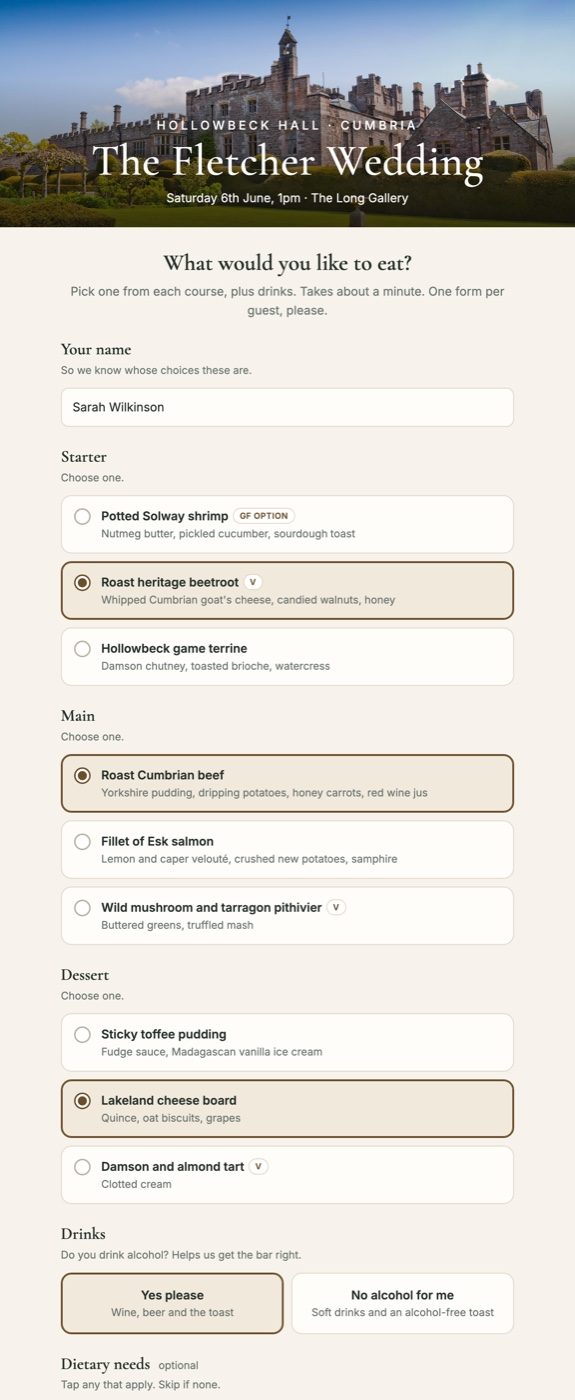
1Guests choose on their phones, in about a minute
The couple sends one link. No app, no login, no account. It opens on any phone and takes less than a minute.
Things worth noticing
- checkThe venue's branding, not a form provider's. The photograph, the house name and the couple's own wording. It looks like part of the wedding, not an admin task.
- checkEvery choice is visible at once. Large tap targets rather than dropdowns, so an 80-year-old guest on a phone can see all three starters without opening a menu.
- checkDish descriptions in full, exactly as the kitchen wrote them, with vegetarian and gluten-free markers.
- checkDietary needs as one tap, plus a free-text box for the things a tick box never covers: “coeliac, so gluten-free bread with the starter please.”
- checkNothing is mandatory that doesn't need to be. Name and three courses, then done.
One form per guest, so there's no guessing who the “2 beef, 1 fish” belonged to.
2The couple sees the totals update as replies arrive
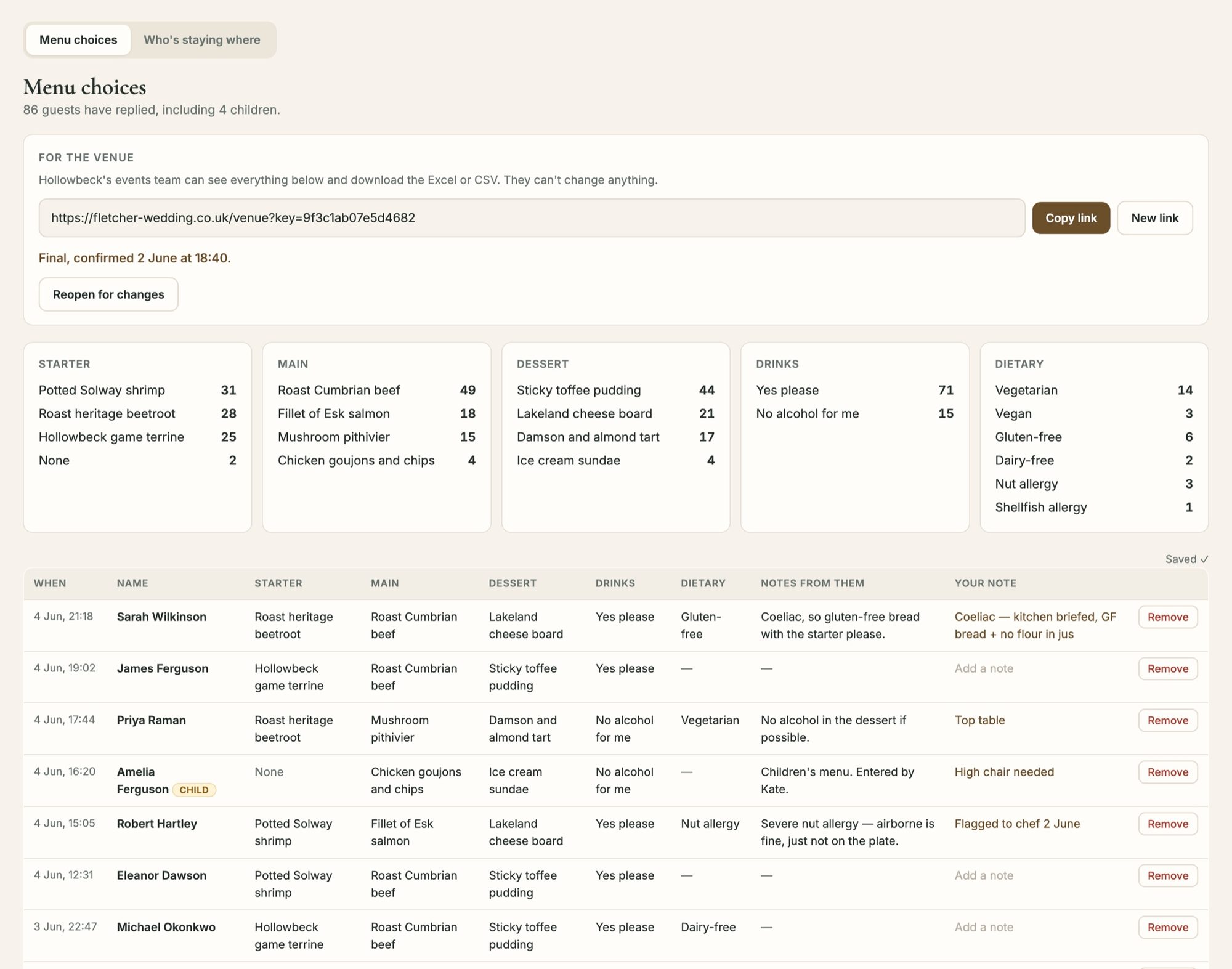
The same information, one screen, no spreadsheet.
What the couple gets
- checkLive counts per dish, so they always know where they stand. 49 beef, 18 salmon, 15 pithivier. No counting rows.
- checkDietary totals alongside, including the four children.
- checkEvery reply in a table, with the guest's own words preserved.
- checkTheir own private note against each guest, next to the guest's note. “Kitchen briefed, no flour in jus.” “High chair needed.” This is where the phone calls and corridor conversations end up, instead of in a WhatsApp thread.
- checkA “Child” marker for pricing and seating, independent of what the child is eating.
- checkA read-only link to send the venue, and a “Mark as final” button, which is the moment the venue has been waiting for.
Everything saves as they type. There is no Save button to forget.
3The venue gets its own page, and a proper export
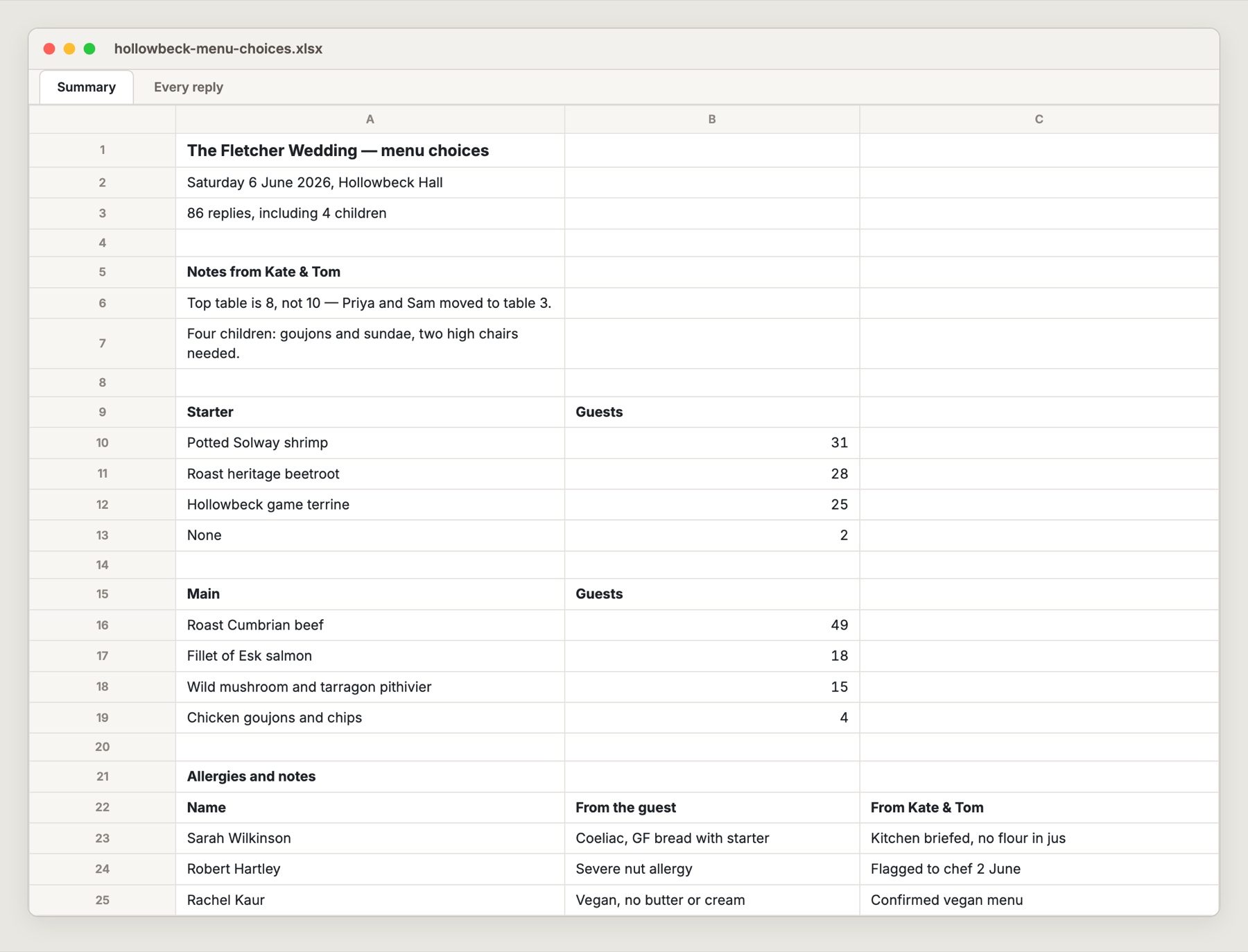
The events team gets a link of their own. They see everything, download whatever they need, and cannot change anything.
Built for the kitchen, not for a database
- checkA summary tab first: the headcount, the couple's notes, then every dish with its number.
- checkAn allergies and notes section that puts the guest's words and the couple's instruction side by side.
- checkA second tab with every guest, one row each, for seating plans and place cards.
- checkCSV as well, for whatever system the venue already uses.
The venue's page also shows a banner, one of these two:
hourglass_topNot final yet: the couple are still collecting replies.
verifiedFinal list, confirmed by Kate and Tom, 2 June at 18:40.
If a reply arrives after that, both sides are told. That single banner removes most of the “is this the latest version?” email traffic.
What This Replaces
| Before | After |
|---|---|
| Menu choices arrive as texts, cards and emails | One link, one reply per guest |
| Someone retypes them into a spreadsheet | The spreadsheet builds itself |
| Allergies live in an email thread | Allergies sit next to the guest's name, in the export |
| “Is this the final version?” | A dated confirmation the venue can see |
| Changes mean a new spreadsheet | Changes appear instantly on the venue's page |
What It Takes to Run
One page and one database
It runs on a small server for a few pounds a month, and the whole thing is a single folder of files.
No accounts, no app
No guest accounts, no app to download and no cookie banners. Guests never log in, and nothing is tracked.
Private by design
The guest page is hidden from search engines, and the venue's link can be revoked and replaced in one click if it is forwarded somewhere it shouldn't be.
Set up in an afternoon
Mostly spent typing in the menu, which lives in one place and can be changed at any time.
Where a Venue Could Take It Further
The same pattern fits anything where guests choose and a kitchen needs a total:
- checkChristmas party bookings, where a company books for 40 and the dishes trickle in.
- checkAfternoon tea and Sunday lunch pre-orders.
- checkMulti-day events: arrivals, departures and who is staying which nights, which the live version also handles.
- checkA simple page for guests the couple can send with directions, taxis and local walks.
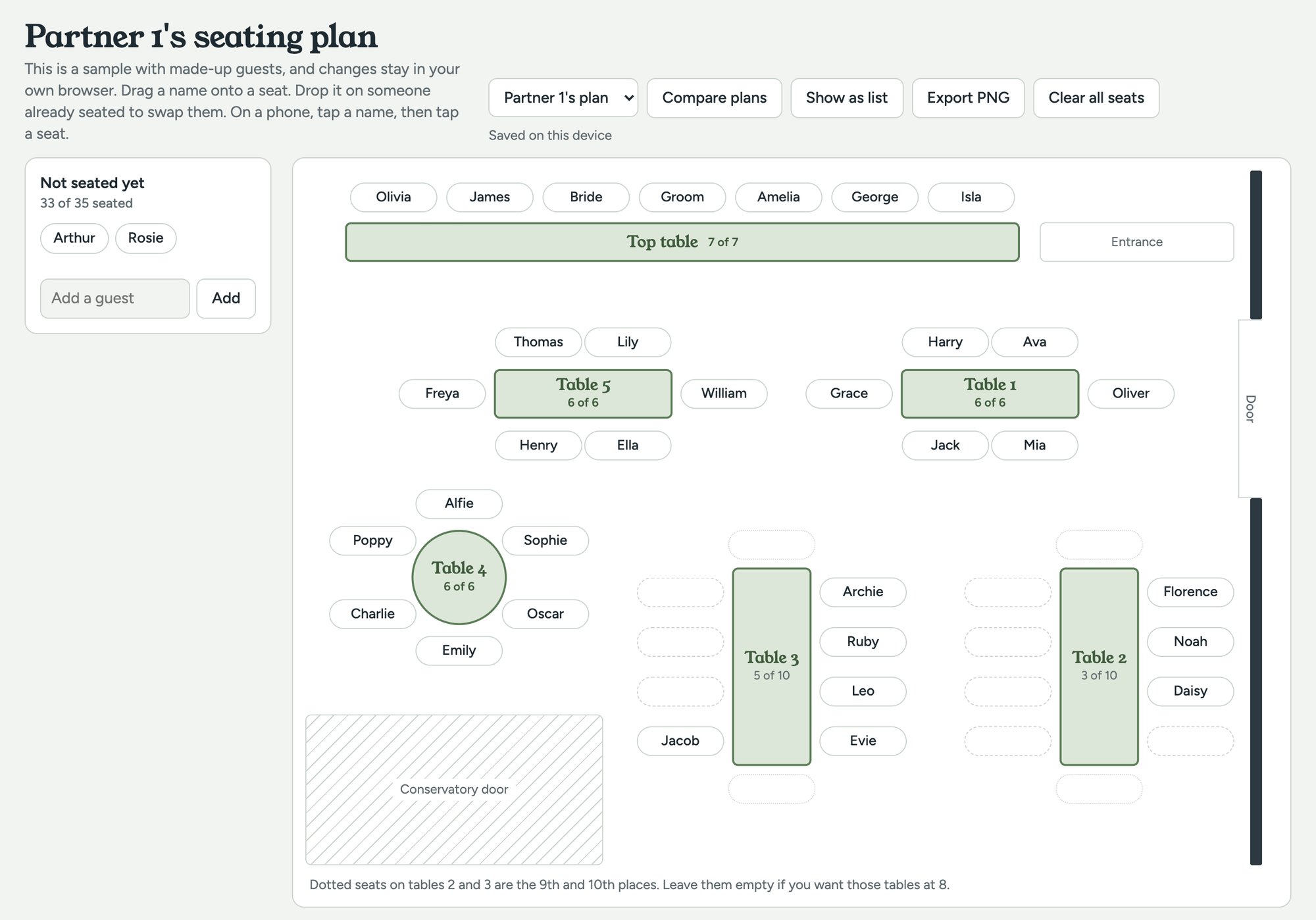
- checkSeating plans: drag guests onto tables, then save the plan. Try our sample seating planner.
Want This for Your Venue?
The system you've seen is real. It was built for a real wedding at a Cumbrian country house, with the names and dishes changed here. We're happy to walk you through the real one.
Photo: Hutton-in-the-Forest, Cumbria, by Michael D Beckwith (CC0, via Wikimedia Commons), standing in for the fictional Hollowbeck Hall.